
Important! If you are reviewing your answers in Review mode and need to "add" an answer to a REPEAT question, you must switch to Continue mode in order to add an item to a REPEAT question. See also Reviewing Your Work.
|
|
Important! If you are reviewing your answers in Review mode and need to "add" an answer to a REPEAT question, you must switch to Continue mode in order to add an item to a REPEAT question. See also Reviewing Your Work. |
Certain sets of questions will repeat as they gather information about sets of people or situations. For example, a Title may need information on a couple's children; the questions soliciting this information need to be repeated for each of the couple's children.
The program addresses these situations with a unique type of question called a Repeat Question, such as the Child Info question below.
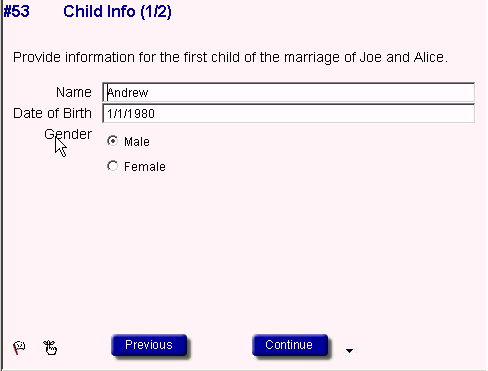
This particular Repeat Question actually consists of 3 separate questions: name, date of birth and gender. However, keep in mind that Repeat Questions can consist of only one question. For instance, in the estate planning products you may be asked for the name of a successor trustee, so in this case the Repeat Question will only have one question within it.
There is always a counter at the top of the Repeat Question screen, such as the (1/2) in the screen shot above, where the right number indicates the total number of iterations and the left number indicates which iteration is currently on screen. For example, (1/2) would indicated that there are two children and information about the first child is currently on screen.
When you are done answering the questions within the Repeat, you will be taken to a Repeat Control Question like the one below.
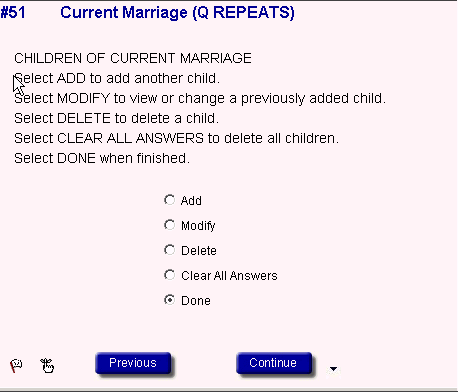
Here is where you can add another child, modify your answers, delete the child, clear all answers (if you have entered more than one) or select Done to move to the next question.
Here's how the Add, Modify, Delete, Clear All Answers and Done options listed on the screen shot above work:
Once you have entered the first child, you would select Add at the Repeat Control Question and click Continue to enter the 2nd child. You would then be taken to the same name, date of birth and gender questions as before. After you are done answering the questions, the program will take you back to the Repeat Control Question with Done as the default. Click Continue to move on to the next series of questions.
To modify your answers, click Modify and then Continue. On the next screen, select the member whose information you want to modify and click the OK. This action takes you to the first question in the repeat sequence you have chosen.
|
|
Important: To review or edit the answers you have provided for a Repeat Question, select Prev Repetition or Next Repetition on the Answers menu when in the particular Repeat Question. This will move you sequentially through the iterations (e.g., will move from the first to the second child). Thus, to edit information about a particular repeat question, you might locate the data question on the Navigator (e.g., child's age), and then use Prev Repetition or Next Repetition to access the age data for the child at issue. |
To delete your answers, select Delete and then Continue. On the next screen, select the member whose information you want to delete and click the OK. Deleting an iteration deletes all information for that person or situation. Note: You can delete ALL answers at the same time by selecting Clear All Answers.
At any time you may return to any Repeat Question to modify or delete previously provided answers or to delete ALL answers by selecting Clear All Answers. To do so you must first identify the Repeat Control Question on the Navigator, which is indicated as (Q REPEATS) on the Navigator, and click on it. Then, select Modify, Delete or Clear All Answers at the Repeat Control Question and click Continue. On the next screen, select the member(s) whose information you want to modify or delete and click the OK. If you are modifying your answers, this action takes you to the first question in the repeat sequence you have chosen. See also Changing Answers.
